Anyone in the AV or networking biz who’s spent more than a minute on social media has learned that misery loves company — especially when it comes to lousy cable management.
There are entire pages and threads and comment sections devoted to griping about cleaning up someone else’s horrible nest of cabling (and a host of other tech install nightmares, including poorly mounted gear). But there’s another truism at work here in those links: Folks in the tech world also love to show off those perfectly managed cabling jobs, with pristine racks and intuitive labeling, ready for service or updates and devoid of even the slightest chance of crosstalk. Those racks inevitably lead to cable runs that disappear from view.
WHICH WIRE DO I CUT? Reddit post
The takeaway? Ultimately, that good design on the front end saves time (and prevents headaches and heartburn) later.
A LITTLE BIT OF PATCHING Reddit post
That’s why integrators get enthused about devices with thoughtful cable management built right into the hardware itself. It means that the people who designed that object understand exactly what happens on a job site, and how both good and bad things that may seem small at first blush become big things when they’re multiplied at scale.
What’s in a Bracket?
That’s what happened when Crestron rolled out its new Collab Compute solution at the ISE 2026 Expo. The device is a purpose-built hardware platform for pro AV installations that powers Microsoft Teams Rooms and Zoom Rooms software on Microsoft Windows operating systems. Powered by an Intel Core Ultra processor with an integrated neural processing unit (NPU), it’s built to handle the demands of the AI tools that are an integral part of the modern work environment.
Visitors to the booth were just as excited by what was on the outside of the box as the processing power and functions that lived inside. As Crestron EVP of Customer Success and Marketing Brad Hintze noted on a recent podcast with rAVe TV, “One of the ‘sleeper hits’ at our booth was the mounting bracket for our Collab Compute.” The bracket itself allows the device to be taken on and off a surface without tools, making it easy to change connections.
“That device must have come on and off the wall 500 times a day during the show,” says Hintze. “And that speaks to the testing we do when it comes to our hardware alone — the bracket didn’t really show any signs of wear at all, and its functionality stayed consistent.”
Beyond the bracket, the way the device handles cable connection was another big topic of discussion in the Crestron booth.
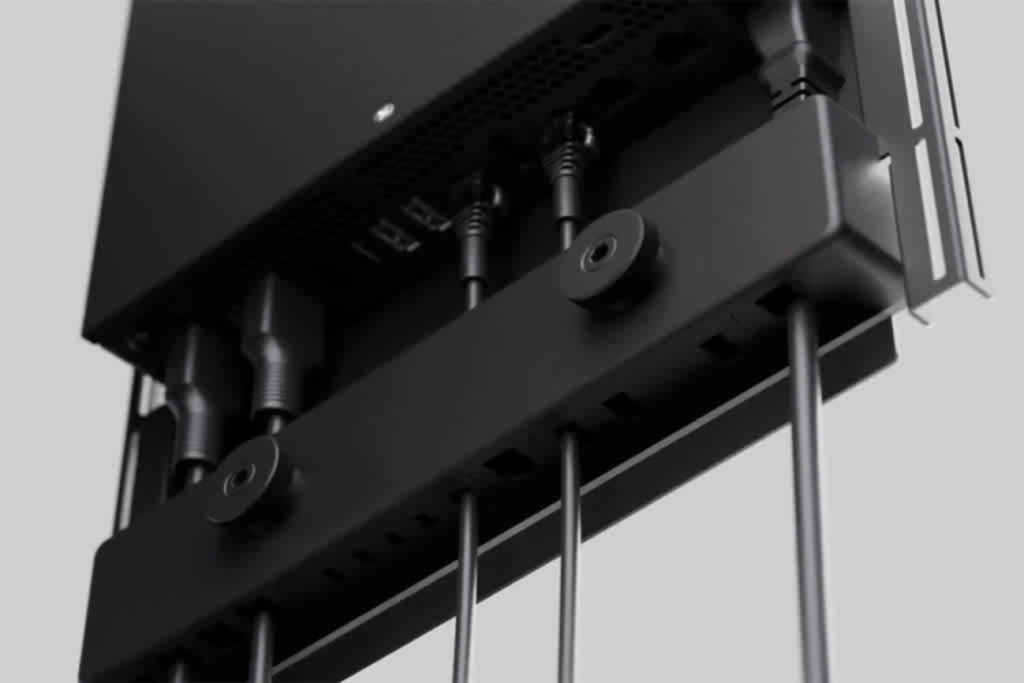
Top-Tier Cable Management
“We received a lot of compliments on the cable management that we built into the Collab Compute,” says Joel Mulpeter, Crestron’s senior director of product marketing. The cabling options in this device are very robust, including HDMI out (three) and one HDMI in, multiple USB ports (types A and C), LAN ports, antenna connections, and a port for Crestron DigitalMedia technology solutions. The box is built to handle everything from small rooms to large, high-impact spaces with options for connecting intelligent video, intelligent audio, BYOD devices, control panels, and more.
For the connections at the rear of the box, there are channels built into the bracket that guide each cable. Those cables are then held in place by a plate with a rubber-on-rubber connection that bolts over them to keep them secure. “There’s never a tangle coming out of the box, and the setup provides a clean, clear routing path,” says Mulpeter.
All of this makes it easy to connect, add, update, or remove those cables — and maybe most importantly, it keeps things from becoming unintentionally disconnected. “If someone’s cleaning around the device, or reaching near it, there’s really no way to accidentally pull a cable — they’re essentially locked in.”
Advantages at Scale
Now imagine deploying this solution multiple times across an enterprise, and the efficiencies begin to multiply. “When you make something intuitive and easy to install, that saves a little time,” says Mulpeter. “When you need to repeat that process over and over again in multiple rooms, that saves a lot of time.”
This kind of forethought in the design and manufacturing process is a direct result of the feedback loop between Crestron and client. “Things like the Collab Compute cable management system may seem at first glance like nice-to-have features that were not top of mind during the development process — but it’s these very details that were informed by having conversations with our customers,” says Mulpeter. “And we spend a lot of time in those conversations for just that reason.”
“We talk about ‘engineering a culture of collaboration’ at Crestron,” says Hintze. “That’s not just a slogan.
“When a client is saving time, effort, and resources because we’ve made the installation that much easier, they can really focus on their business.”
Learn more about Crestron Collab Compute here.