When it was Hungary’s turn to host the European Council, the integrator turned to new meeting software to handle proceedings. Paul Milligan reports.
Most of you will be familiar with the results but not all of you will be overly familiar with workings of The European Council and how it operates. It has been designed to bring EU leaders together to set the EU's political agenda. It represents the highest level of political cooperation between EU countries. The European Council operates on a system of rotating presidencies, where each member country takes on the presidency for six months. This role comes with the responsibility of chairing international meetings across various committees of the European Council.
In the second half of last year, Hungary held the presidency, hosting these meetings in the heart of Budapest. The Castle Garden Bazaar venue, near Buda Castle, was transformed into a modern and flexible meeting space fully equipped with the standard of AV technology you would expect from visiting high-ranking foreign dignitaries.

In charge of deploying the conference and interpretation technology was local integrator Avio Media. “We were the subcontractor of the general contractor technical service provider of the Presidency of the Council of the EU. Avio Media was responsible for the design and implementation of the entire conference and interpretation technology, automatic camera and digital nameplate systems. We were also in charge of the AV network which handled Dante, control and all video-over-IP. The general contractor (Visual Europe) supplied the other technologies, such as the audio system, video system, lighting technology,” explains Avio Media managing director, Krisztián Tolvaj.
Typically used at high-level international events, Avio Media, as the designer and system integrator, was also responsible for integrating a system that would make the display of delegates' names both distinctive and informative.
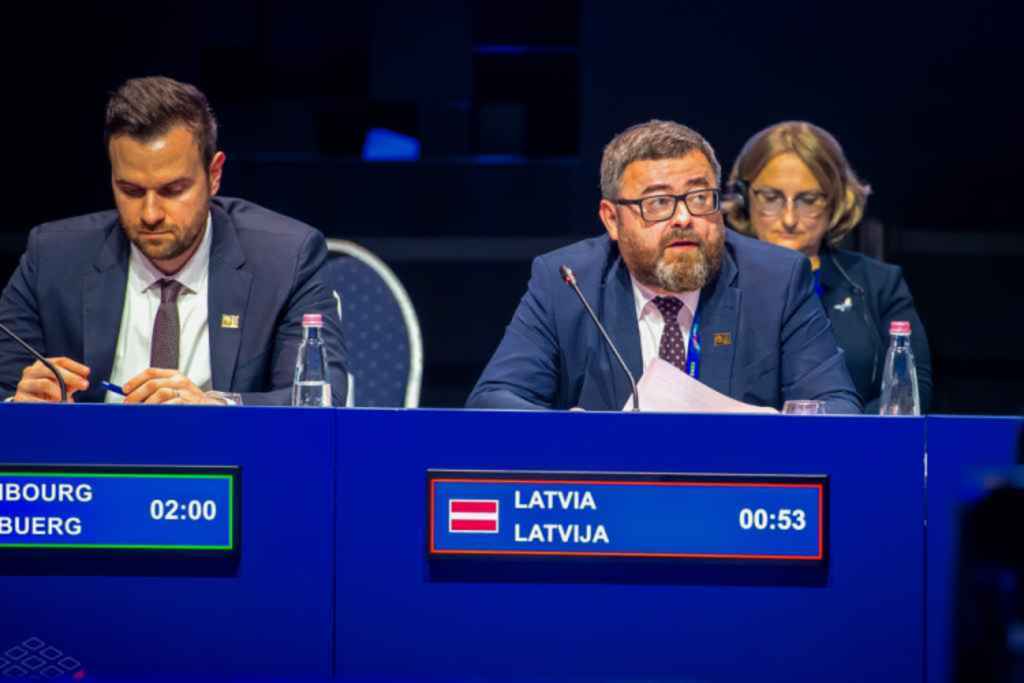
What was the client brief to Avio Media in those first meetings? “The EU Council encouraged major technical requirements, and our task was to design and implement technology that would meet all the challenges and meet the demands of international top events. We had to be technically prepared for all possible needs that may arise,” says Tolvaj. The main venue was the Castle Garden Bazaar, and featured eight rooms in total including a conference room, meeting rooms, a press room, and interpreter rooms, all equipped with AV. This project was especially notable for the introduction of new conference software by MVI AudioVisual, which made its debut during the EU presidency meetings.
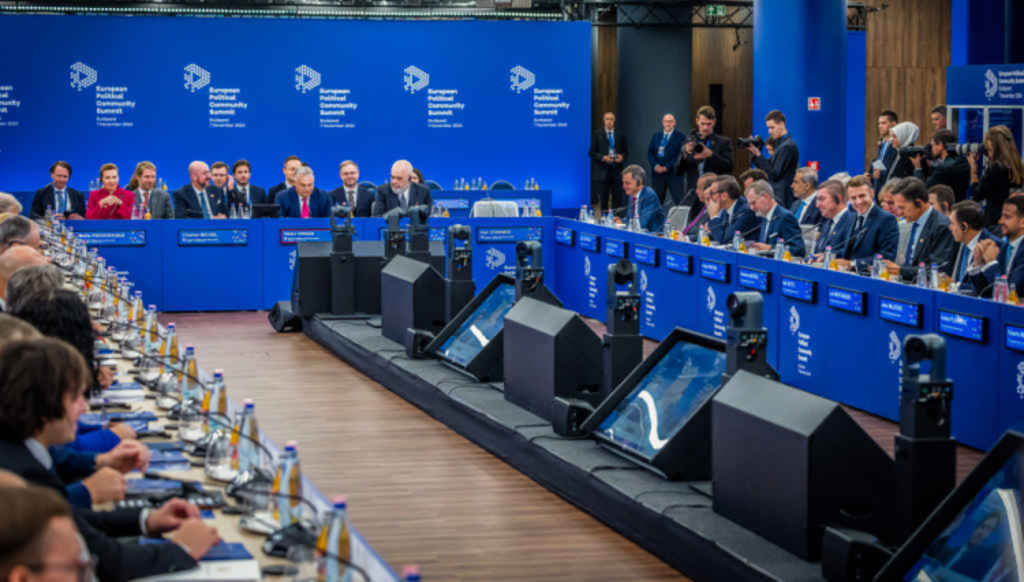
The meetings hosted at Castle Garden Bazaar several times a month created a busy atmosphere with technicians, delegates, press, and interpreters all around. To ensure each speaking delegate was perfectly captured, a fully automated camera control algorithm was employed. This algorithm directs the twelve Avonic 4K PTZ cameras towards active speakers, with all camera-switching performed automatically, eliminating visible movements. The system was capable of displaying the lower thirds showing the speaker’s country name, flag and speech time without the need for manual input. Once a meeting started, everything was set to run as automatically as possible.
This level of automation allowed the operating technician, just one in this case, to focus on fine details such as adjusting focus and making other small corrections. Tactile control was provided through a compact PTZ controller, which continuously reflected the status of the automated algorithm. The video processing was also fully automated, capable of handling all 4k50 video streams from the twelve cameras simultaneously. This entire process was run on a single Windows PC, resulted in a compact AV rack, and because the whole setup is IP-based, wiring and installation were easy to manage.

In addition to the video feeds from the 12 PTZ cameras, there was an additional NDI source integrated into the software video mixer, which ingested presentations from a separate meeting video desk. This presentation source was displayed side-by-side with all active speakers. The resulting video was routed directly to the meeting room, interpreter booths, and press rooms, with an additional clean feed via SDI sent to the broadcast studio.
The venue featured moving walls and tables to accommodate either 50 or 80 delegates per meeting. When the technician prepared and started a meeting, the system automatically loaded the appropriate control surface, synoptic view, camera presets, colour and light settings appropriated for the layout.

The fully IP-based system minimised the number of cables needed under the tables, resulting in a flexible but clean setup. Each discussion microphone included an output for a headset, allowing delegates to listen in their preferred language. Onsite translators worked from dedicated interpreter booths, making multilingual accessibility possible.
Participants were easily identifiable through electronic nameplates which displayed each representative's country and flag in full colour, as well as the remaining speech time. A blue background was added to ensure the displays blended with the environment. The same software that generates the video lower thirds also drove these displays and kept everything in continuous sync based on a prepared list of seat assignments. Upon entering the room, participants could locate their seats and start the discussion with little difficulty.

Participants who requested to speak used the discussion microphones, and the chairperson (always a representative from Hungary), could manage these requests from a separate tablet, turning on the correct microphones. This setup ensured the meeting ran as smoothly as possible.
The main installation took two months, with much of the design work and testing done off-site due to site access issues. This was one of the most difficult parts of the install according to Tolvaj. “We didn't have much time, as there were other events at the locations a month before the start. Therefore, we prepared a lot of things at our site [programming, user interfaces, training] and also assembled the systems and brought them to the location ready.” The choices of specific technology were made after Avio Media looked at different manufacturers in the conference sector explains Tolvaj. “We examined the techniques and needs of previous EU presidencies. Based on this, we designed the systems according to our own experience and knowledge.”
How did Avio Media overcome any security concerns that come with working on high-level governmental projects? Was AV on its own server here? “The Bosch Dicentis used a standalone server and MVI conference software suites was on a second one. Beside them there we used three client PCs for control and for the content of the hall displays.”
How did he get buy-in from the on-site IT team to what he was installing? “We used only the passive elements of the local network, e.g. cabling, connection points and patch panels. The delivery, the internal IT cabling of the systems and the configuration of the new network switches were our tasks.” To make sure everything ran smoothly over the period of the meetings, the technicians received training after the handover. “In
the first month, we participated in every meeting of the technical team, helping and supervising the work of the technicians. According to the agreement, we supported the systems for the remaining time,” says Tolvaj. To further ensure sure everything went as well as it could, before each meeting the chairperson also received brief training on how to use the control tablet and the system.
KIT LIST
Avonic 4Kk PTZ cameras
Bosch Dicentis conference system, Integrus interpretation system
Cisco switches
MVI AudioVisual conference and camera automation software
Netgear switches
ProDVX electronic nameplates and control touchpanels
Skaarhoj PTZ